
Key takeaways
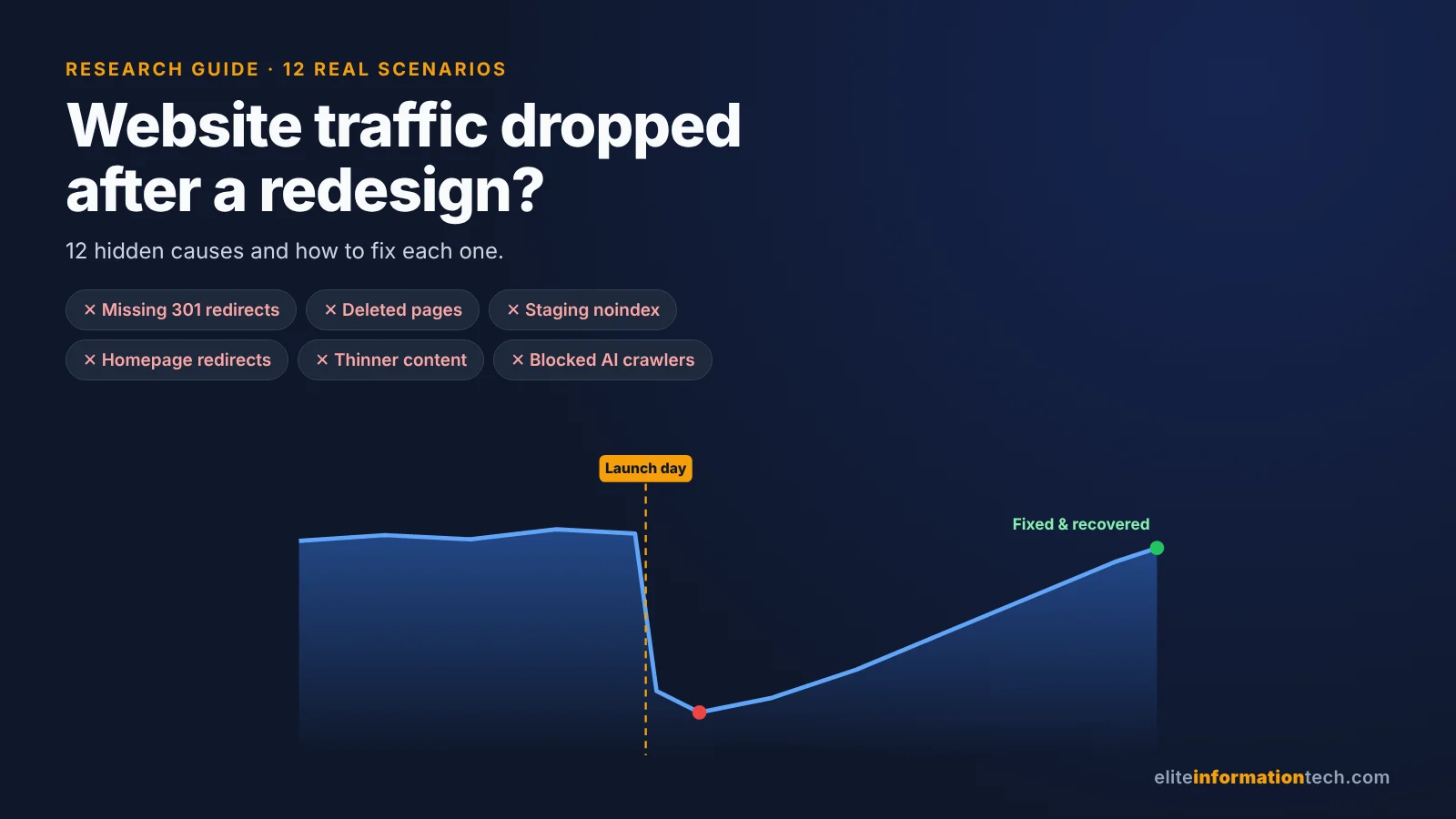
- Most post-launch drops have one specific cause: missing or wrong 301 redirects, removed content or internal links, or staging settings such as
noindexcarried over to the live site. - Some dip is normal. Same-domain redesigns with clean redirects usually settle within two to six weeks; domain migrations take months.
- Google doesn't penalize redesigns, but redirecting every old page to the homepage is treated as a soft 404.
- Name the drop first: tracking, indexing, ranking or demand. Each needs a different fix, so run the 72-hour triage before changing content.
- Check AI crawlers too. A new host, CDN or security plugin can block ChatGPT and Perplexity bots while Google rankings look normal.
- Rolling back is almost never the answer. Fix forward and keep 301 redirects in place for at least a year.
Why did my traffic drop right after the new website went live? Did the redirects break something? Was it a mistake to delete those old pages? Is Google punishing us for the redesign, or will it come back on its own? And how long is this going to take? If you've changed your website recently and these questions are keeping you up at night, you're not alone. In a study of 1,052 domain migrations, fewer than one in four had recovered their traffic after 90 days. The good news: most of these drops have a specific, fixable cause, and this guide shows you how to find yours.
The messages we get about it usually sound like one of these:
- "We moved from WordPress to Shopify and lost about half our organic traffic."
- "We kept every URL the same. Why did our rankings still drop?"
- "Our developer deleted 300 old blog posts to 'clean things up'. Now our service pages are slipping too."
- "We rebranded and changed our domain. It's been four months."
- "Traffic looks normal, but leads have dropped by a third since the new site went live."
If one of those sounds familiar, this guide is for you. We went through the largest public studies on website migrations, Google's own documentation, years of on-the-record statements from Google's search team and the most-read articles on this topic. Then we mapped all of it to the 12 real situations where websites lose traffic after a change, with what usually broke and how to fix it.
Short answer: Websites lose traffic after a redesign, migration or redirect change because Google can no longer find, trust or match the pages that used to rank. The usual causes are missing or wrong 301 redirects, deleted pages that held backlinks, staging noindex or robots.txt blocks left on at launch, thinner content and weaker internal links, and broken analytics. Same-domain redesigns typically settle in two to six weeks; domain migrations took a median of 304 days in a 2026 study of 1,052 sites. A drop that's still deepening after six weeks points to a problem you can find and fix.
- Two large migration datasets: SALT.agency's 2026 study of 1,052 domain migrations and the 10 Spurs study of 892 migrations published by Search Engine Journal.
- Google's documentation on site moves, redirects, HTTP status codes and debugging traffic drops.
- Public statements from Google's John Mueller between 2016 and 2022 on redesigns, redirects, URL changes and site merges.
- Behavior and crawler data: Pew Research Center's 2025 study on AI summaries, plus OpenAI's and Cloudflare's crawler policies.
- What our own SEO team sees when auditing sites after launch.
What the research says: 7 findings every site owner should know
- Some dip is expected. Google's site-move guide tells you to expect temporary fluctuation in rankings and says medium-sized sites can take a few weeks or more before the new URLs show up properly.
- Full processing can take months. In January 2022, Mueller said URL changes are "not that simple for search engines" and can take several months for Google to fully process. Important URLs get handled first.
- Domain moves are slow. Across 1,052 domain migrations, SALT.agency found a median recovery of 304 days. Only 22.8% had recovered by day 90, about 59.5% by day 365, and 13.9% showed no full recovery after three years.
- Some never come back. In the 10 Spurs dataset of 892 migrations, the average recovery took 523 days and 17% hadn't recovered after 1,000 days. The four fastest made it in 19 to 33 days.
- Clean work recovers fast. Local SEO Guide documented two large, well-planned migrations (600,000 and 1.4 million URLs) that recovered in roughly 30 to 60 days.
- Redesigns aren't penalized. Mueller: "There is nothing on our side that is kind of saying that" a revamped site must change in ranking. The changes you make are what Google reacts to.
- Not every drop is yours. Pew Research Center found people clicked a traditional result on 8% of visits when an AI summary appeared, versus 15% without one. If you launch during a core update or an AI Overviews expansion, two causes overlap.
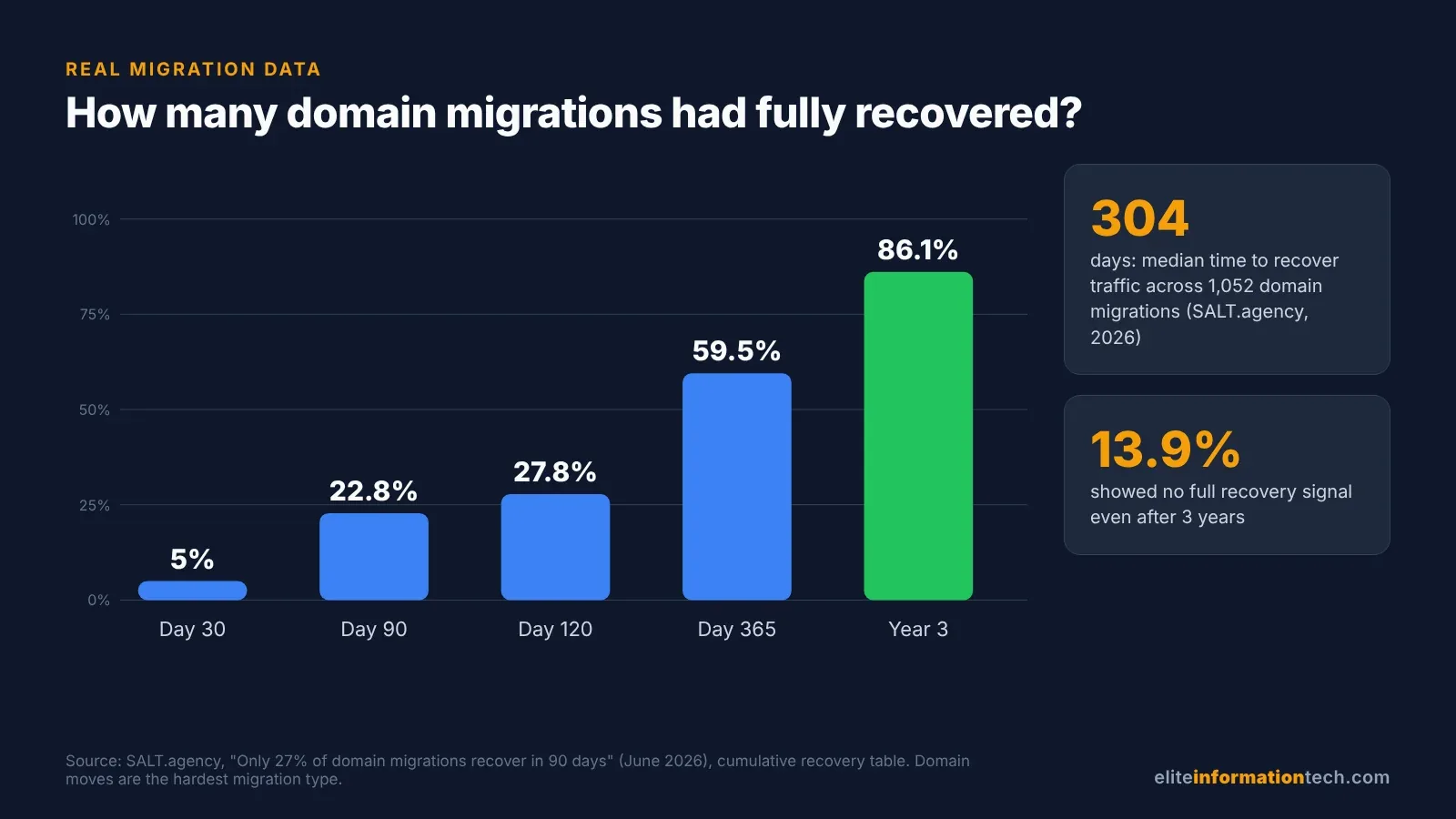
The spread is the real story. Some sites were back inside a month and others never recovered. What separated them was planning, redirect quality and how much the content changed, which is exactly what the scenarios below are about.
Which change did you make? 12 real scenarios and their fixes
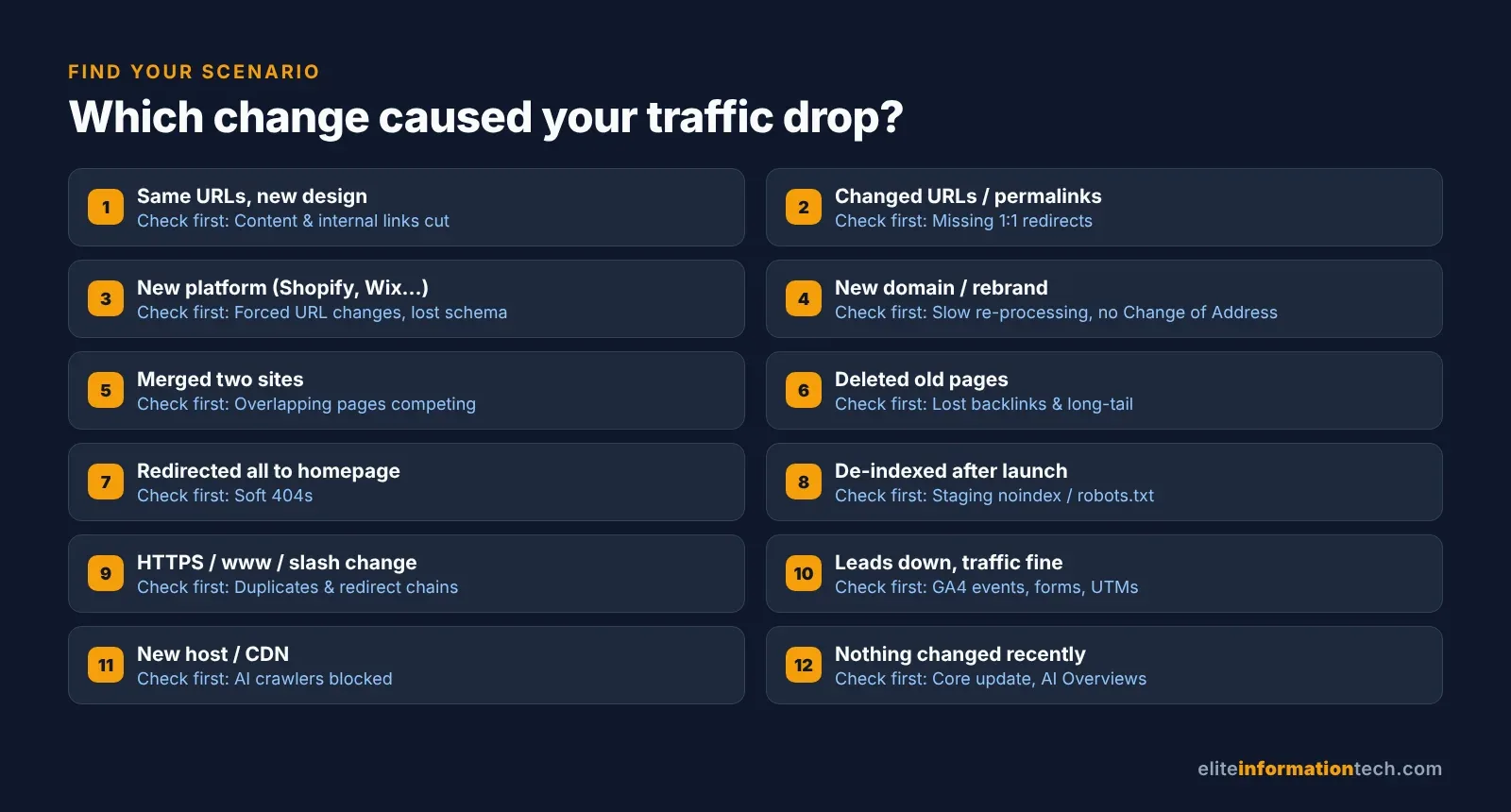
Find the one that matches what happened on your site. Many sites have two or three at once, so read any that are even close.
1. "We redesigned the site, kept the same URLs, and rankings still dropped"
What you'll notice: No 404s, redirects look fine, but specific pages slide a few positions, often your most important service or category pages.
What usually broke: The page itself changed. The 1,400-word service page became 350 words, a headline and three icons. H2s that matched real searches vanished, FAQs were cut, reviews moved elsewhere, and the main menu got trimmed so key pages lost internal links. Mueller has warned against treating a theme as "just a splash of color on top of a finished structure," and said presentation "in the long run could reflect something that is visible in search as well."
The fix: Pull the old version of each losing page from the Wayback Machine and compare it with the new one: word count, title, H1, subheadings, FAQs, schema and the internal links pointing in. Restore what matched search intent, even if it means a less minimal design.
2. "We changed our URL structure or WordPress permalinks"
What you'll notice: A spike in "Not found (404)" in Search Console's Page indexing report, and old URLs lingering in Google for a while.
What usually broke: Removing dates from blog URLs, renaming folders or "tidying" slugs gives every page a new address. Without one-to-one redirects, Google sees pages disappear. Warning against changing URLs just for SEO, Mueller said "if you're lucky, it'll end up in the same place."
The fix: Map every old URL to its new one and use server-side permanent redirects (301 or 308). Google uses a permanent redirect as a strong signal that the new URL should replace the old one; a temporary 302 doesn't send that signal. If the URLs didn't truly need to change, the safest fix is often to change them back.
3. "We moved to a new platform: WordPress, Shopify, Wix or Webflow"
What you'll notice: A broad drop across products, categories and blog posts all at once.
What usually broke: Every platform has its own URL rules. Shopify, for example, forces fixed prefixes such as /products/, /collections/, /pages/ and /blogs/, so a WordPress URL like /blue-running-shoes/ can't stay the same. Products can also load at /collections/name/products/item, which relies on canonical tags to avoid duplicates. Migration apps usually redirect products and pages but miss tag archives, image URLs, PDFs and old campaign pages.
The fix: Export every old URL before switching, build the redirect map in a spreadsheet, and import it into the new platform's redirect manager. Afterwards, check that canonical tags point at the clean product URL and that your structured data (Product, Review, Breadcrumb) made the trip. Still choosing? Our Shopify vs WordPress vs Webflow SEO comparison covers how each handles URLs.
4. "We rebranded and changed our domain name"
What you'll notice: A slow, frustrating climb. The new domain gains impressions week by week while the old one fades, and the total sits below where you were for months.
What usually broke: Often nothing. Domain moves are simply the slowest kind of migration, as the SALT and 10 Spurs data shows. Things get worse when redirects aren't page-to-page, when the Change of Address tool isn't used, or when the old domain is allowed to expire.
The fix: Redirect every old URL to its exact equivalent, verify both domains in Search Console and submit a Change of Address, and ask your top linking sites to update their links. Keep the old domain registered for good. Google says to keep redirects as long as possible, generally at least a year, and Mueller has said one year is the minimum.
5. "We merged two websites into one"
What you'll notice: Combined traffic ends up lower than the two sites earned separately, and rankings bounce around longer than in a normal migration.
What usually broke: Mostly expectations. Mueller has said that when you merge or split a site, "it's a lot harder for us to process that compared to a normal site," and that "it's not absolutely clear what the final state will be." Two pages that competed for the same keyword become one, so you'll never simply add the traffic together.
The fix: Before merging, list overlapping pages on both sites and decide which one survives for each topic. Fold the best content from both into that page, then 301 the other to it. For small and medium sites, Google recommends moving all URLs at once rather than section by section.
6. "We deleted old pages or blog posts"
What you'll notice: Long-tail traffic shrinks, and sometimes your main pages slip too, because the deleted posts were linking to them.
What usually broke: Content was pruned on looks, not data. That dated 2019 article might have had 40 referring domains and ranked for 300 small queries. Google says 404s don't harm your site's indexing or ranking overall, but each deleted page that earned traffic or links takes that value with it.
The fix: Check deleted URLs in Ahrefs, Semrush or Search Console's Links report. Restore or redirect anything with backlinks or meaningful clicks to the closest relevant page. Let the truly worthless ones return a 404 or 410; Google treats 4xx errors (other than 429) the same way, so either is fine.
7. "Our developer redirected everything to the homepage"
What you'll notice: Lots of URLs labeled "Soft 404" in Search Console, and old pages vanishing from results instead of being replaced.
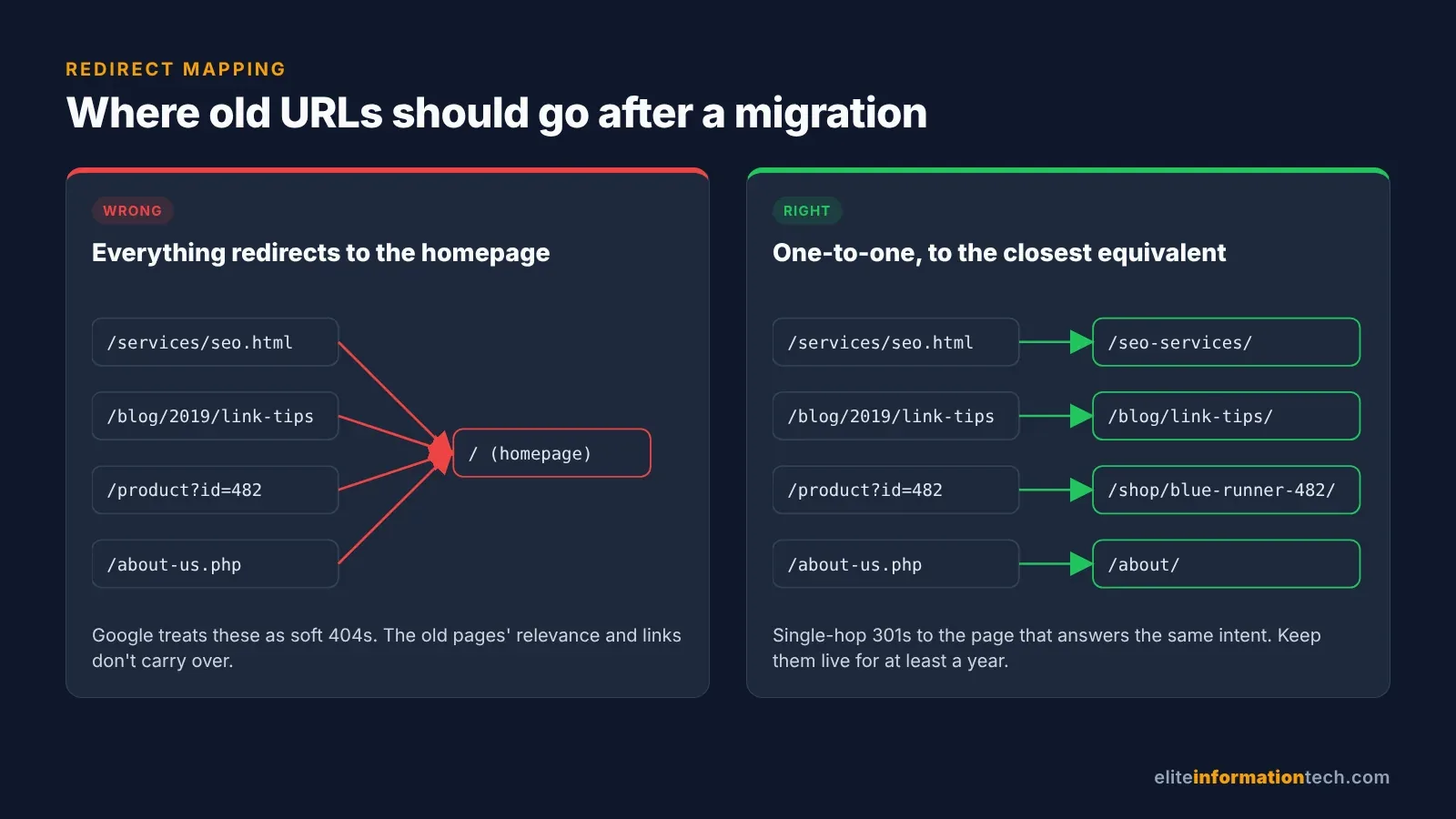
What usually broke: The shortcut itself. Mueller has said a "301 redirect from all pages to the home page, that would be something that we see as a soft 404s." The old page's relevance doesn't carry over to a homepage that doesn't answer the same search. For pages with no match, his advice is to "make a better 404 page instead."
The fix: Re-point each redirect to the closest matching page. Where nothing matches, let it 404 with a helpful page that links to your main sections.
8. "The new site was de-indexed right after launch"
What you'll notice: Impressions drop towards zero within days across the whole site. This is the loudest alarm there is.
What usually broke: Staging settings went live: a sitewide noindex, a robots.txt with Disallow: /, an X-Robots-Tag header you won't see in the page source, or canonical tags pointing at the staging domain. On WordPress, check Settings › Reading for "Discourage search engines from indexing this site."
The fix: Remove the block, test five key pages with URL Inspection, resubmit your XML sitemap, and request indexing for your most important URLs. Caught within a week, this one usually recovers quickly.
9. "We switched to HTTPS, changed www/non-www or trailing slashes"
What you'll notice: Duplicate versions of pages in the index, or "Alternate page with proper canonical tag" counts climbing.
What usually broke: Both versions still load, or redirects run in chains (HTTP to HTTPS, then to www, then to the trailing-slash version). Google's advice is to redirect straight to the final URL and, if that's not possible, keep chains "ideally no more than 3 and fewer than 5" hops. These moves don't need the Change of Address tool, but they're still migrations.
The fix: Pick one canonical format, redirect every other variant to it in a single hop, and update internal links, canonicals and sitemaps to match.
10. "Traffic looks fine, but leads and sales dropped"
What you'll notice: Search Console clicks are steady, yet GA4 conversions or form fills are well down.
What usually broke: Measurement or the conversion path, not SEO. The GA4 tag is missing from some templates, key events weren't recreated for the new forms or checkout, a consent banner blocks tracking by default, or redirects strip UTM parameters. Sometimes the new design really does convert worse: longer forms, a hidden phone number, slower mobile pages.
The fix: Compare Search Console clicks with GA4 sessions for the same dates. If clicks are fine, test every form and checkout step yourself, then fix tracking and the user experience before touching SEO.
11. "We changed hosting or CDN and disappeared from ChatGPT and AI answers"
What you'll notice: Your brand used to be cited in ChatGPT search or Perplexity answers and now isn't, while Google rankings look roughly normal.
What usually broke: The new host, CDN or security plugin is blocking AI crawlers. In July 2025 Cloudflare started blocking AI crawlers by default for new customer domains. OpenAI says sites that opt out of its OAI-SearchBot crawler "will not be shown in ChatGPT search answers" beyond basic navigational links.
The fix: Check robots.txt, firewall rules and bot management settings. Decide separately on training bots like GPTBot and search bots like OAI-SearchBot and PerplexityBot; many businesses block training on purpose and search by accident. Add the new site to Bing Webmaster Tools too, since several AI tools draw on Bing. Our AI search optimization (GEO) service covers this in depth.
12. "Traffic fell, but maybe it isn't the redesign at all"
What you'll notice: Positions are roughly stable, click-through rate is down, and competitors are seeing the same pattern.
What usually broke: Nothing on your site. Google confirmed core updates in March and May 2026, AI Overviews keep cutting clicks on informational searches, and seasonality catches people out every year. Mueller has noted that a revamp can land "in such a perfect way" that it coincides with a core update.
The fix: Compare your launch date with Google's confirmed update dates. In Search Console, set the range to the last 16 months to spot seasonal patterns, as Google's traffic-drop guide suggests. If the drop is even across the whole site, including pages you didn't touch, the cause is probably outside your site.
Not sure which scenario you're in? Run the 72-hour triage
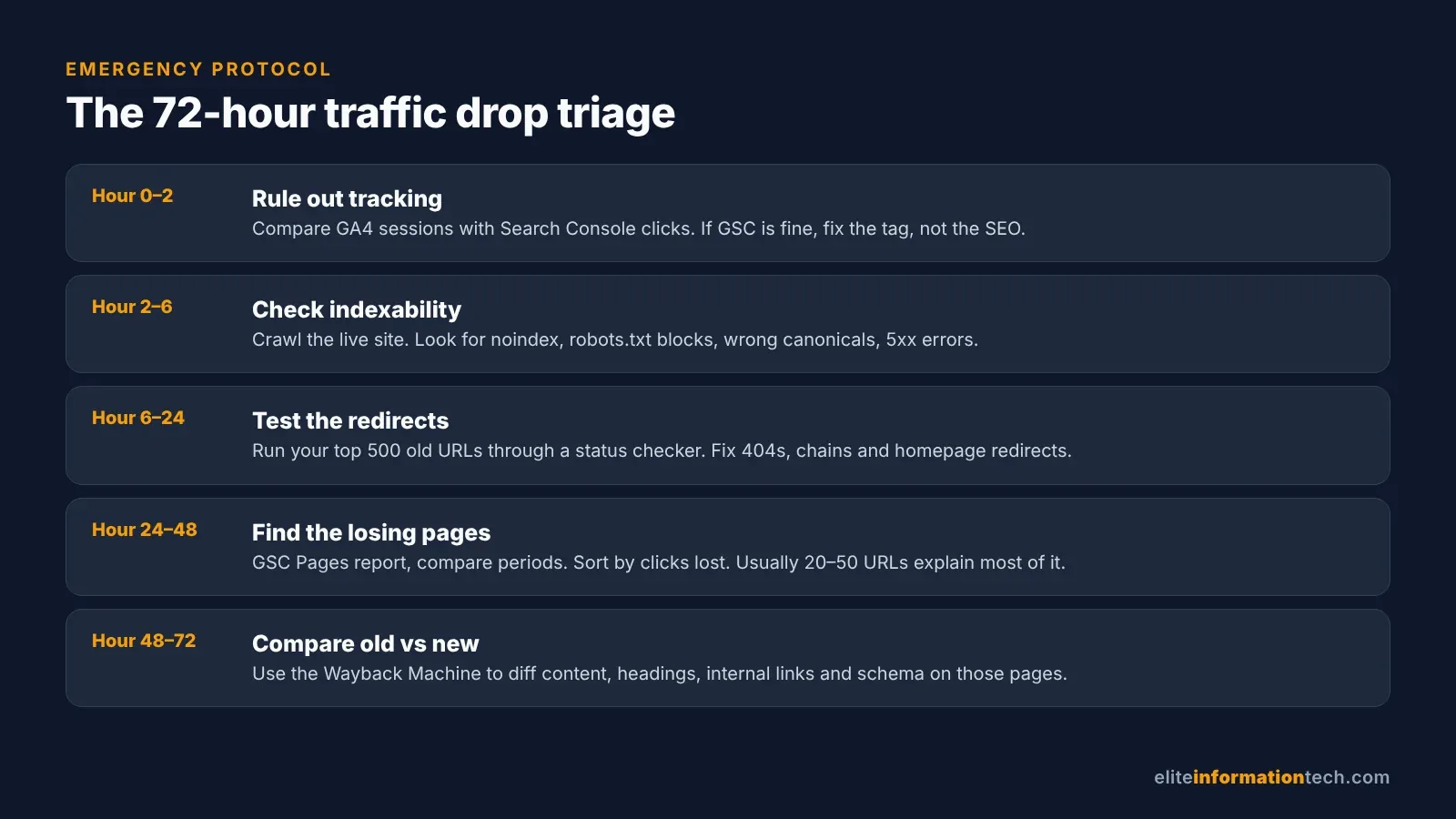
This is the order we work in when a client calls with a post-launch drop. It finds the expensive problems before anyone starts rewriting content or buying links. Start by putting GA4 next to Search Console, because the four kinds of drop leave different fingerprints.
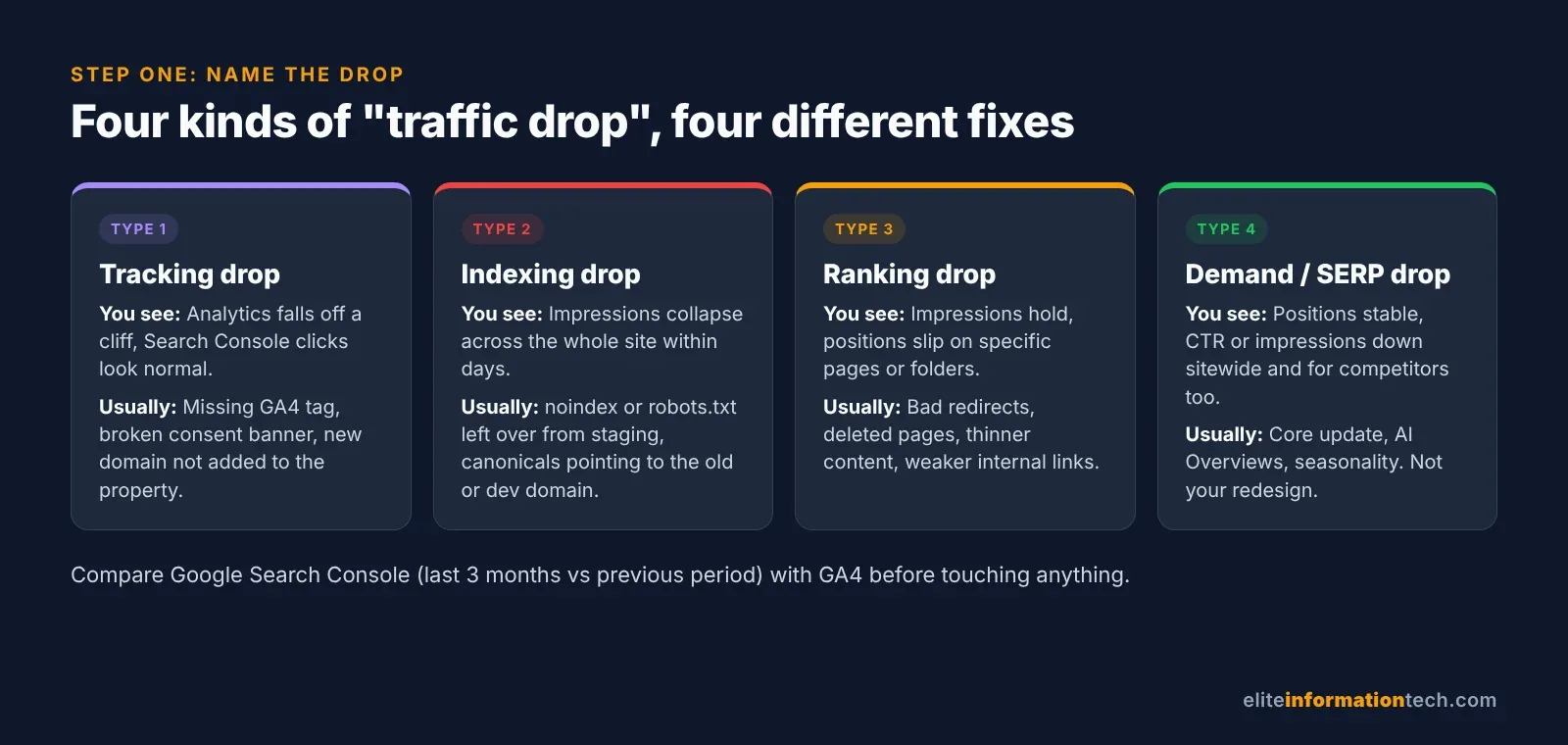
- Hours 0 to 2: rule out tracking. If Search Console clicks are steady and GA4 isn't, you're in scenario 10.
- Hours 2 to 6: check indexability. Crawl the live site with Screaming Frog or Sitebulb for
noindex, robots.txt blocks, wrong canonicals and 5xx errors, which Google says make its crawlers slow down. - Hours 6 to 24: test the redirects. Export your top 500 pre-launch URLs from Search Console, which keeps 16 months of data, and run them through a bulk status checker. Each should return one permanent redirect to a relevant live page.
- Hours 24 to 48: find the biggest losers. In the Performance report, compare equal periods before and after launch, open the Pages tab and sort by click difference. A few dozen URLs usually explain most of the loss.
- Hours 48 to 72: compare old pages with new. Use the Wayback Machine to check content, headings, internal links and schema on those pages.
Lost your old URL list? How to rebuild a redirect map
It happens all the time. The old server is gone and nobody saved the URLs. You can still recover most of them by combining:
- Search Console: set the Performance report to dates before launch and export the Pages tab.
- Backlink tools: Ahrefs, Semrush or Majestic list the old URLs other sites link to. Save these first.
- The Wayback Machine: archived sitemaps and navigation menus.
- Page indexing report: the "Not found (404)" list is Google showing you which old URLs it still remembers.
Dedupe, prioritize by clicks and backlinks, and map each to its closest equivalent. Mueller's advice is to "track the individual URLs, so that you have a clear map of what previously was and what it should be in the future."
Should you roll back the redesign?
Almost never, though few people will tell you that. Rolling back is a second migration: Google has to reprocess every URL again, your new redirects need reversing, and any recovery that had started is lost. Two weeks of panic followed by a rollback usually leaves a site worse off than six weeks of fixing.
There are two exceptions. If the new platform truly can't do what search needs (no proper 301s, content that only appears with JavaScript, URL rules you can't control) and the fix is months away, reverting to the old site on its original URLs can be the lesser evil. And if you launched days ago and the old site is still sitting there untouched, a quick revert while you fix staging is reasonable. Otherwise, fix forward.
How long until traffic comes back? A 30/60/90-day plan
| Window | Focus | What "good" looks like |
|---|---|---|
| Days 1 to 30 | Fix blockers: indexing, tracking, redirects, staging leftovers. Resubmit sitemaps and request indexing for your top 20 to 50 pages. | Impressions stop falling. 404 and soft 404 counts start dropping. |
| Days 31 to 60 | Restore lost content and internal links on the biggest losers. Fix Core Web Vitals, especially INP. Ask sites linking to old URLs to update their links. | Positions recover on fixed pages. Clicks rise week over week. |
| Days 61 to 90 | Improve, don't just restore: refresh stale pages, add clear answers and FAQs, build relevant links to pages still lagging. | Most pages near previous levels; remaining gaps have a plan. |
Set honest expectations with your boss or client. On the same domain, with clean fixes, most sites settle within two to six weeks and regain most of their traffic within three months. Domain changes take longer: six to twelve months is common, and in the SALT data about four in ten took more than a year.
Planning a redesign? How to redesign a website without losing SEO
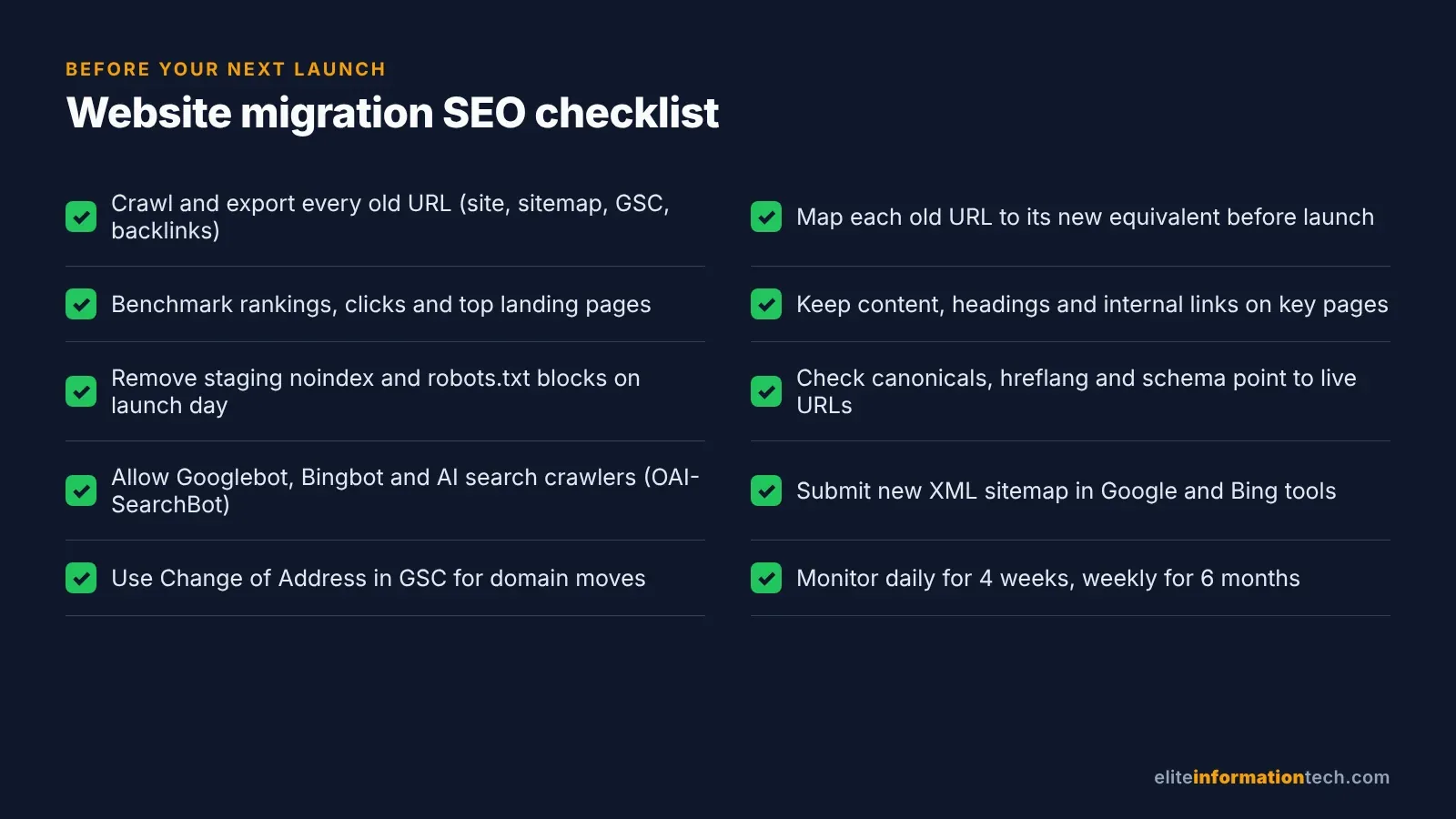
Launching soon? Run this list on staging, then again on launch day. Every scenario above is cheaper to prevent than to fix.
- Bring SEO in at the wireframe stage. Navigation, URL structure and templates are SEO decisions.
- Export every current URL from a crawl, sitemaps, Search Console and your backlink tool, and benchmark clicks, rankings and conversions.
- Keep URLs the same wherever possible. Mueller's advice is that URLs "stay the same as much as possible."
- Map every old URL to a new one and have someone other than the developer check it.
- Protect your best pages: keep their copy, headings, FAQs and internal links unless there's a clear reason to change them.
- Test redirects on staging and avoid chains.
- Recreate tracking: GA4 on every template, key events for new forms and checkout, UTMs that survive redirects.
- Allow the crawlers you want, including Googlebot, Bingbot and AI search bots.
- On launch day, remove staging blocks, check canonicals and hreflang, submit sitemaps to Google and Bing, and use Change of Address for domain moves.
- Monitor daily for four weeks and weekly for six months, and never let an old domain with backlinks expire.
The bottom line
Nearly every post-launch drop we've audited traced back to something specific: a redirect, a tag, a deleted page, a trimmed menu or a stripped-out block of content that Google responded to. Find your scenario, find the losing pages, fix what broke, then give Google time to catch up. And if you're planning a change, do the work before launch. It's far cheaper than recovery.